Ad Hoc Sub-Process
Available from 3.0.0
The ad hoc sub-process is available from CIB seven 3.0.0.
An ad hoc sub-process groups a set of activities that have no predefined order. Unlike an embedded subprocess, it has no start or end event, and its children carry no sequence flows between them — except where a pair is deliberately ordered, which the specification allows and which is described below.
Nothing in the model says which of the activities runs, when, or how many times. That decision is made from outside the process, while the instance is running.
This is what the specification intends. BPMN 2.0 section 10.3.5 places the performers of an ad hoc sub-process outside the model and leaves the manner in which an activity is started undefined. The process engine therefore offers an activation API for exactly that purpose, described in Ad Hoc Sub-Process in the User Guide.
Entering an ad hoc sub-process starts nothing, unless the model names activities to start on entry (activitiesToActivate, under Camunda Extensions). The scope waits, and it goes on waiting between activations, so a scope with no running child is a normal state rather than a stuck one. The scope is left when its completion condition is satisfied, when it is completed explicitly through the API, or — if it declares no completion condition — as soon as at least one activity has been performed and none is still active.
Using an ad hoc sub-process does impose some constraints. Every one of them is rejected when the process is deployed, with a message naming the offending element, so none of these constraints can surprise you at runtime:
- The sub-process must contain at least one activity.
- Start events and end events are not permitted inside it.
- Only
ordering="Parallel", the default, is supported.ordering="Sequential"is rejected rather than silently executed in parallel. Sequential multi-instance on the sub-process itself (isSequential="true") is a different thing and is allowed, see One sub-process per item below. - The sub-process itself cannot be an event subprocess:
triggeredByEvent="true"on it is not allowed, because an event subprocess is started by a start event and a start event is not permitted here. An event subprocess inside it is a different matter — see the next point. - A non-interrupting event subprocess inside it is rejected, and so is a non-interrupting boundary event on one of its activities. The interrupting form of each is permitted.
Within those constraints, the sub-process may contain any activity: user tasks, service tasks, call activities, embedded subprocesses, and further ad hoc sub-processes nested inside it. A child activity may carry multi-instance loop characteristics of its own, and so may the ad hoc sub-process itself — see One sub-process per item below. Boundary events may be attached to the sub-process and to its children.
Ordering some of the activities
Most of an ad hoc sub-process has no prescribed order, but a pair of activities can be ordered by drawing a sequence flow between them. The specification allows this, and says what it means: a performance of the source must be followed by a performance of the target, though not necessarily immediately.
<adHocSubProcess id="claim">
  <userTask id="requestDocuments" name="Request documents" />
  <sequenceFlow id="toCheck" sourceRef="requestDocuments" targetRef="checkDocuments" />
  <userTask id="checkDocuments" name="Check documents" />
  <userTask id="callCustomer" name="Call customer" />
</adHocSubProcess>
When Request documents completes, Check documents starts by itself, and the scope counts it as running work: even without a completion condition, the scope is not left in between.
The target of such a flow is reached from its predecessor and is therefore not directly startable — activating it answers 400, and the message lists what may be started instead. Gateways may be used in the same way: a gateway is reached along an inner flow and routes along its own, so an ad hoc sub-process can carry a small ordered fragment while the rest of it stays ad hoc.
If the completion condition is satisfied by the very completion that takes such a flow, cancelRemainingInstances decides what happens next, exactly as it does for any other work in progress. With the default true the scope completes and the target is not performed. With false the scope waits, the target is performed, and the scope is left once it finishes.
Only activities can be started. An activity is directly startable if it has no incoming sequence flow from within the scope. An intermediate event placed inside an ad hoc sub-process deploys, but activation never starts it: it is reached only along a sequence flow from an activity.
An ad hoc sub-process is visualized as a subprocess carrying a tilde marker at the bottom of the shape. Collapsed, it shows only its name, the tilde and a plus sign:
Expanded, the activities are displayed within the sub-process boundaries, mostly without sequence flows between them:
Example
An ad hoc sub-process is defined by the adHocSubProcess element. All activities that are part of it are enclosed within this element, and an optional completionCondition decides when the scope is left.
<adHocSubProcess id="handleIncident" cancelRemainingInstances="true">
  <userTask id="callCustomer" name="Call customer" />
  <userTask id="checkLogs" name="Check logs" />
  <userTask id="orderSparePart" name="Order spare part" />
  <completionCondition xsi:type="tFormalExpression">
    ${execution.hasVariable('resolved') and resolved}
  </completionCondition>
</adHocSubProcess>
The completion condition is evaluated every time a child activity ends, including the first one. It must therefore tolerate being evaluated before anything has set the variables it reads, which is why the condition above checks for the variable first. A bare ${resolved} deploys and then makes the first task impossible to complete — see Ad Hoc Sub-Process in the User Guide.
cancelRemainingInstances defaults to true and decides what happens to activities that are still running at the moment the condition becomes satisfied. With true they are cancelled and the scope is left immediately. With false the scope stays open until the last of them has finished. In both cases nothing new is activated once the condition has held, even if the condition becomes false again in the meantime; with false, work already under way runs to its end, including the target of a sequence flow that the completing activity took. In the Modeler, the attribute is the Cancel remaining instances checkbox of the Completion group.
One sub-process per item
An ad hoc sub-process may carry multi-instance loop characteristics of its own. The result is one discretionary workspace per item: each instance holds the same optional activities, keeps its own record of whether it has started anything, and is left on its own terms. In the Modeler, add the marker with the wrench of the sub-process and fill Collection and Element variable in its Multi-instance group.
<adHocSubProcess id="claim">
  <extensionElements>
    <camunda:inputOutput>
      <camunda:inputParameter name="settled">${false}</camunda:inputParameter>
    </camunda:inputOutput>
  </extensionElements>
  <multiInstanceLoopCharacteristics camunda:collection="claims" camunda:elementVariable="claim" />
  <userTask id="requestDocuments" />
  <userTask id="callCustomer" />
  <serviceTask id="checkRegister" camunda:class="..." />
  <completionCondition xsi:type="tFormalExpression">${settled}</completionCondition>
</adHocSubProcess>
Two completion conditions can appear here, and they decide different things. The one directly inside adHocSubProcess, entered in the Completion group, is the ad hoc sub-process’s own and is decided per instance: when settled becomes true in one claim, that claim is left. A completionCondition inside multiInstanceLoopCharacteristics, entered in the Multi-instance group, belongs to the loop: when it holds, the remaining instances are cancelled and the loop ends.
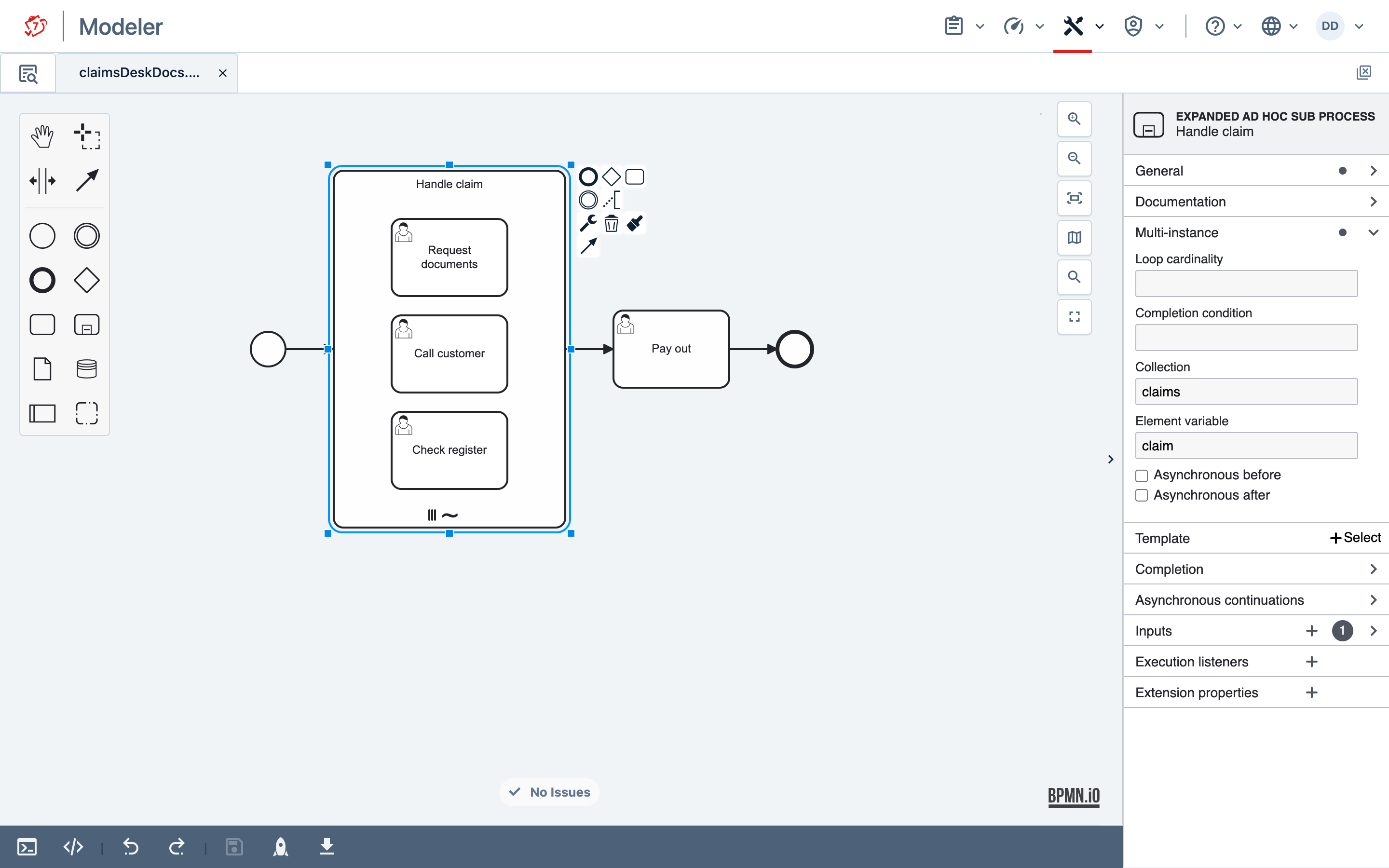
Activation names an execution, so with several instances alive a caller has to say which one it means. The loop’s element variable is how: it is set on the execution of each instance, so an ordinary execution query returns exactly one, and that execution is what the ad hoc methods accept. The calls are shown in Ad Hoc Sub-Process in the User Guide.
With isSequential="true" one instance exists at a time, the next created only once the previous has been left.
These things about an instance are decided per instance rather than per sub-process:
- What is started. Activities started in one instance are invisible to the others, and completing one leaves the rest running. The process continues past the sub-process once every instance has been left.
activitiesToActivatestarts its activities in every instance. - Whether anything has been started. Each instance keeps its own record of it.
- The completion condition — but not the variable it reads. A variable written by an ordinary task completion resolves upward and lands on the process instance, where every instance’s condition reads it, so satisfying the condition in one instance stops the others accepting further activation. A
camunda:inputParameteron the sub-process, as in the example, gives every instance its own copy and keeps them independent; in the Modeler it is entered in the Inputs group. - What is cancelled.
cancelRemainingInstancesacts within one instance; it never cancels work in the others.
Two executions are refused by name rather than silently ignored: the multi-instance body, which holds every instance and so identifies none, and an instance that has already completed, whose execution the engine keeps in order to count it against the loop’s cardinality.
Limitations
Two of the constraints listed above deserve their reasons in full. Both are constructs BPMN 2.0 permits, and both are refused at deployment with an error naming the element:
| Construct | Why it is refused | What the specification says |
|---|---|---|
ordering="Sequential" |
Sequential means only one activity at a time across the whole sub-process. To order particular activities instead, connect them with a sequence flow, as described under Ordering some of the activities. |
Table 10.22 defines Sequential as one activity being performed at a time. |
| A non-interrupting handler inside the scope: an event subprocess, or a boundary event on one of the scope's activities | Such a handler runs alongside the activity it reacts to. Completing it while that activity is still running fails and is rolled back, leaving a task nobody can finish — and because that depends on which of the two finishes first, the model would pass a test run and fail in production. Make the handler interrupting (which ends the scope), attach the boundary event to the sub-process itself, or handle the event outside the scope. | Section 10.3.5 permits both; it says nothing about this combination. |
An ad hoc sub-process without a completion condition is left as soon as at least one activity has been performed and none is still active. This is the one deviation to know rather than discover: BPMN has no notion of automatic completion, so such a scope deploys without complaint and then follows this rule.
An interrupting event subprocess is unaffected by the refusal above and remains the supported alternative to a non-interrupting one. It ends the scope: whatever is running is cancelled, and the scope is left when the handler finishes. To react to an event and keep the scope open, attach a non-interrupting boundary event to the sub-process itself.
When the completion condition is evaluated, what happens once it has held, how to keep a scope open deliberately, and what migration does with an active scope are runtime behaviour rather than modelling rules: see Ad Hoc Sub-Process in the User Guide.
Camunda Extensions
| Attributes | camunda:asyncBefore, camunda:asyncAfter, camunda:exclusive, camunda:jobPriority |
|---|---|
| Extension Elements | camunda:failedJobRetryTimeCycle, camunda:inputOutput, camunda:properties |
| Constraints |
The camunda:exclusive attribute is only evaluated if the attribute
camunda:asyncBefore or camunda:asyncAfter is set to true
|
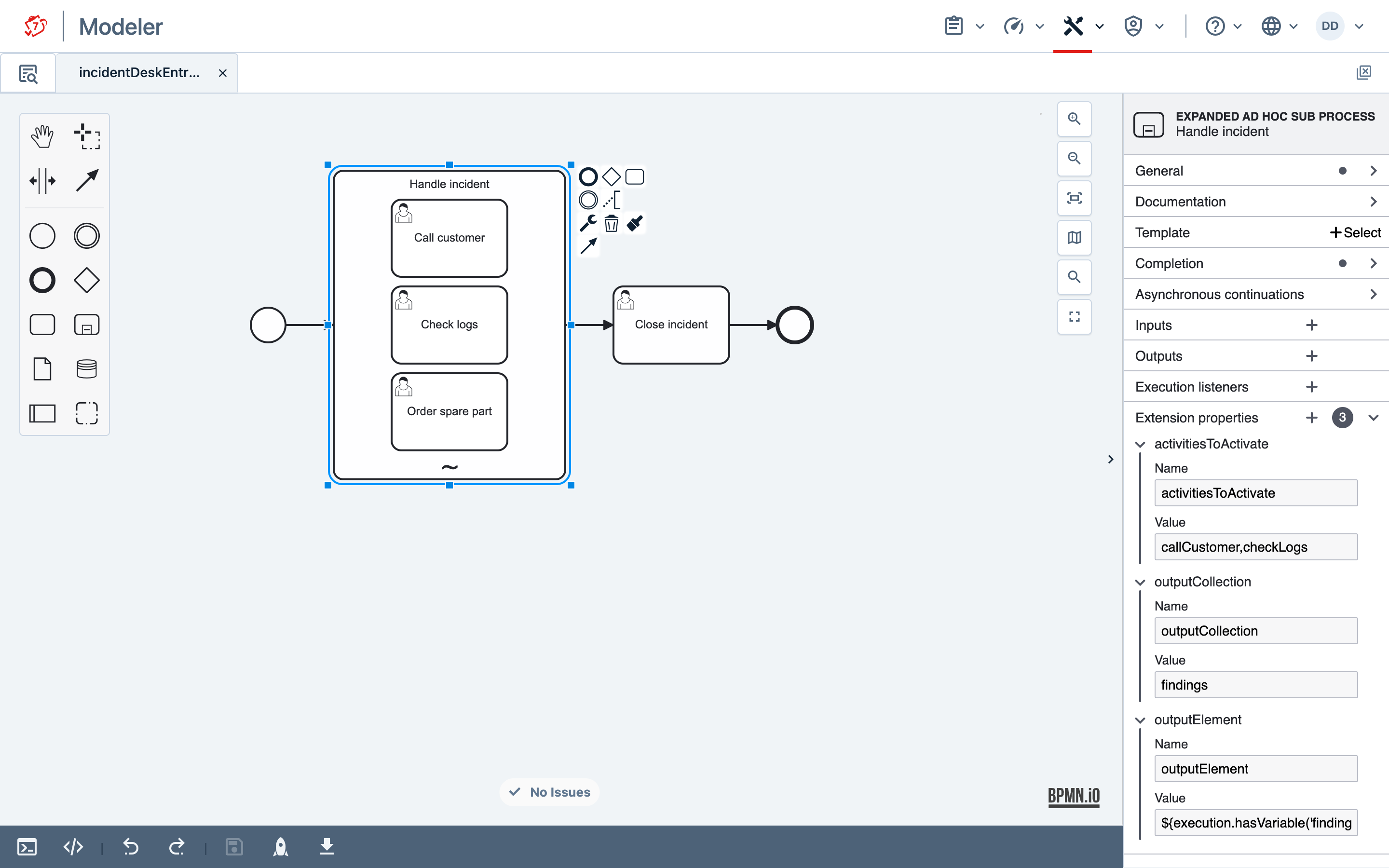
A camunda:property named activitiesToActivate declares which activities are started when the scope is entered, instead of leaving every activation to the API:
<adHocSubProcess id="handleIncident">
  <extensionElements>
    <camunda:properties>
      <camunda:property name="activitiesToActivate" value="callCustomer,checkLogs" />
    </camunda:properties>
  </extensionElements>
  <!-- ... activities ... -->
</adHocSubProcess>
The value is either a literal list of activity ids — comma-separated, as above, or a JSON array such as ["checkLogs","orderSparePart"] — or an expression evaluating to such a list, to a collection or an array of ids, or to a JSON array, which is what a variable of type Json holds. A literal list is validated when the process is deployed; an expression can only be checked when it is evaluated, which happens when the scope is entered.
A scope without a completion condition is left as soon as the activities started on entry are done. If more work is to follow, give the scope a condition.
The property is read when the process is parsed and never becomes a process variable, so an activity inside the scope cannot rewrite which activities its own scope starts.
In the CIB seven Modeler, these properties are entered in the Extension properties group of the sub-process, and the completion condition in its Completion group:
Two further properties, outputCollection and outputElement, gather what the activities produce. An activity of an ad hoc sub-process may be performed more than once, and its output mapping writes to the same variable every time, so without gathering only the last result survives:
<adHocSubProcess id="handleIncident">
  <extensionElements>
    <camunda:properties>
      <camunda:property name="outputCollection" value="findings" />
      <camunda:property name="outputElement" value="${execution.hasVariable('finding') ? finding : null}" />
    </camunda:properties>
  </extensionElements>
  <!-- ... activities ... -->
</adHocSubProcess>
outputCollection names the variable to gather into; outputElement is an expression evaluated once for each activity that completes, and its value is appended. Guard it like the completion condition: a bare ${finding} fails when an activity completes before anything has set finding, and that activity cannot be completed. The variable is written where an ordinary variable written from the sub-process goes, so it outlives the scope; with multi-instance markers on the sub-process, every instance appends to the same variable on the process instance.
Both properties or neither: one without the other is rejected at deployment, because a collection with nothing to put in it would gather nothing and report no error.
The expression is evaluated against the activity that completed, which puts it in reach as execution, and a null result appends nothing. One expression serves every activity of the sub-process, so these two rules are what let it gather selectively and record which activity produced an entry:
<camunda:property name="outputElement"
                  value="${execution.currentActivityId == 'checkLogs' ? finding : null}" />
Without a condition of that kind every completing activity contributes an entry, including one that wrote nothing — in which case the expression sees whatever the previous performance left and appends it again.
Three details follow from where the expression is evaluated. An activity with loop characteristics contributes one entry for the whole loop rather than one per iteration, and for that entry execution.currentActivityId names the generated body, such as reviewDocument#multiInstanceBody. Activities connected by a sequence flow inside the scope contribute one entry, at the end of the chain — or, if the completion condition is met on a flow inside the chain and cancelRemainingInstances is true, at the step that met it, with the rest of the chain not performed. An activity that is cancelled — by an interrupting boundary event, or because the completion condition was satisfied — contributes nothing, and neither does an event subprocess, which is a handler rather than a performance.
Additional Resources
- Ad Hoc Sub-Process in the User Guide — the activation API, its REST equivalents, and the runtime semantics
- Agentic Ad Hoc Sub-Process in the User Guide — an AI agent that decides which activities to start
- BPMN 2.0 specification, section 10.3.5, and tables 10.22 and 10.33