Deep Links
Available from 2.3.0
Deep links are available from CIB seven 2.3.0.
Deep links let you connect a process or decision view in Cockpit directly to an external application, carrying the current process/decision context along with it. This is useful when a business process is complemented by a separate system — for example an archive, a document viewer, or a case-management tool — and users need a one-click way to jump from a process instance into that system, already scoped to the right record. Deep links are configured entirely in config.json — no custom frontend code needs to be built or deployed.
For End Users
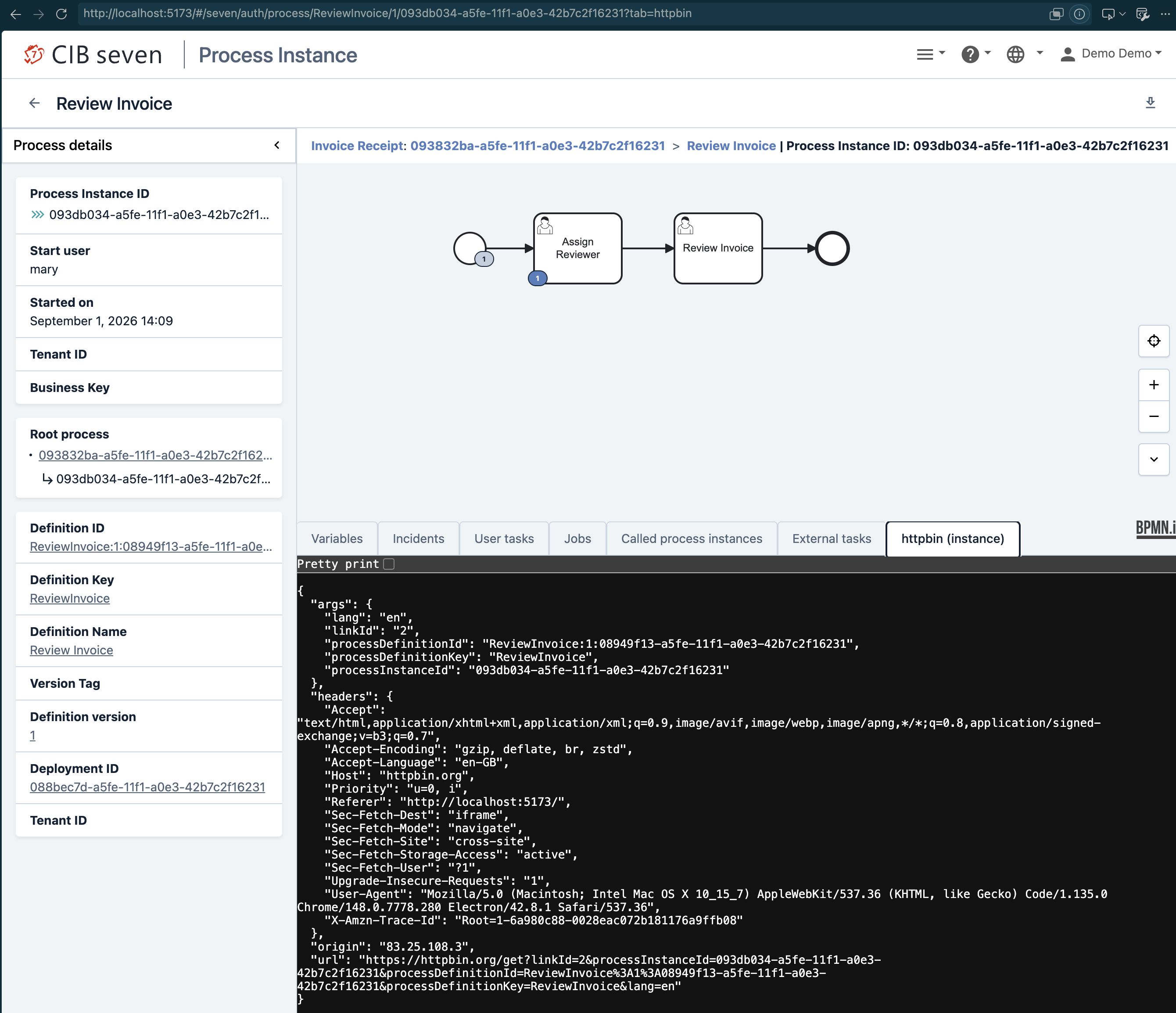
A configured deep link shows up as either a tab or a button, depending on how it was set up:
- Tab-type links add an extra tab next to the standard ones (Variables, Incidents, …) on a process instance, a process definition’s instance list, a decision definition version, or a decision instance. Clicking the tab loads the external application directly inside the page, embedded in an iframe — no new browser tab or window opens.
- Button-type links add a button next to the existing action buttons — for example on the process instance variables table, the process definition/instance action bar, a decision definition version, or a decision instance’s inputs/outputs. Clicking the button opens the external application in a new browser tab/window. Hovering over the button shows a tooltip with the link’s label and target URL.
In both cases, the external application automatically receives the relevant context — such as the process instance id or business key — appended as parameters to the configured URL (see Appended Parameters below). Once translated, the tab or button shows a proper label; until then, it falls back to showing the configured id.
For Administrators
Deep links are configured via a deepLinks section in config.json. Each of the four sections corresponds to a view in Cockpit, and lists the deep links available there:
"deepLinks": {
  "processDefinition": [
    { "id": "myExternalTab", "url": "https://external.example/app", "type": "tab" }
  ],
  "processInstance": [
    { "id": "myExternalTab", "url": "https://external.example/app", "type": "tab" },
    { "id": "myExternalButton", "url": "https://external.example/app", "type": "button", "target": "myExternalButtonWindow", "icon": "mdi-file-document-outline" }
  ],
  "decisionDefinition": [],
  "decisionInstance": []
}
Entry Properties
id— required. Must match^[a-zA-Z0-9_-]+$(letters, digits,-and_only) and must not collide with a built-in tab id (e.g.variables,instances,inputs). These characters are safe unencoded both as a JSON string value and as a URL query parameter value, and./~are deliberately excluded so the id can’t be confused with the.-separated nesting used by thedeepLinks.{section}.{id}.titletranslation key below.url— required. Must be an absolute URL pointing at the external application.type— required to make the entry visible. Eithertab(embedded iframe tab) orbutton(opens in a new browser tab/window). An entry with a missing or unrecognizedtypepasses id/url validation but is not shown as either a tab or a button — silently, with no console warning — so double-check this value if a configured link doesn’t appear.target— optional,button-type entries only. Passed as the window name to the browser’swindow.open(). Defaults to_blank, which always opens a new tab/window; set it to a fixed, non-_blankname to reuse the same popup window across repeated clicks instead. Has no effect ontab-type entries.icon— optional,button-type entries only. A Material Design Icons CSS class shown next to the button’s label (e.g.mdi-file-document-outline). Defaults tomdi-checkbox-marked-circle-plus-outlinewhen omitted. Has no effect ontab-type entries.
An invalid entry — a bad id format, a missing url, an id colliding with a built-in tab, or a duplicate id — is dropped with a console warning; it doesn’t break the other configured deep links.
Label
Add a translation key deepLinks.{section}.{id}.title to your translations_*.json, for example deepLinks.processInstance.myExternalTab.title. This label is used for the tab or button, and — for tab-type entries — as the embedded iframe’s title. If the key is missing, all three fall back to the plain id, never a broken-looking raw translation key.
Appended Parameters
The following parameters are automatically appended to the configured URL’s query string, depending on the section:
| Section | Appended parameters |
|---|---|
processDefinition |
processDefinitionId, processDefinitionKey, processDefinitionVersion, processDefinitionVersionTag, processDefinitionTenantId, lang |
processInstance |
processInstanceId, businessKey, processDefinitionId, processDefinitionKey, processDefinitionVersion, processDefinitionVersionTag, processDefinitionTenantId, lang |
decisionDefinition |
decisionDefinitionId, decisionDefinitionKey, decisionDefinitionTenantId, decisionDefinitionVersion, decisionDefinitionVersionTag, lang |
decisionInstance |
decisionInstanceId, decisionInstanceTenantId, processInstanceId, decisionDefinitionId, decisionDefinitionKey, decisionDefinitionTenantId, decisionDefinitionVersion, decisionDefinitionVersionTag, lang |